If you run a WordPress agency, your procedures and project management may be scattered across Google Docs, SaaS applications, multiple WordPress installations, or buried in email.
This makes it hard to find the right instructions or see where a project stands.
I built OrbitalWP to bring your procedures and project management into WordPress. You can write your procedures, create tasks, and link each task directly to the instructions. OrbitalWP gives you the tools to organize your work, track progress, and update your most important tasks.
This guide will walk you through setting up OrbitalWP from the ground up. You will decide where to install it, structure your knowledge base, write your procedures, and create tasks that link back to the instructions.
Decide Where Your Procedures Will Live
Step 1 – decide where to install OrbitalWP and store your processes and procedures.
I keep my procedures, internal documentation, and OrbitalWP tasks on a subdomain.
I do not want to store my business procedures and task list on OrbitalWP.com. That is my marketing and ecommerce platform. It is not for internal documentation. It makes more sense to me to log in to the subdomain I’m working on SOPs and checking items off to-do list.
For example, I could use tasks.orbitalwp.com as a private environment for project management and internal documentation.

But John, do I have to use a subdomain?
No, you do not have to use a subdomain if you don’t want to. You can install OrbitalWP on your primary website and store your procedures there.
Build Your SOP Knowledge Base
Once you choose where the system will live, decide how you will publish and organize your procedures.
You can:
- Create a custom post type for procedures
- Use standard WordPress posts
- Use standard WordPress pages
I recommend using a custom post type. It keeps your procedures separate from your other content and gives you more control over how they are organized and displayed.
You could name the post type “Procedures,” “SOP,” or “KB,” for Knowledge Base.

Use a Custom Post Type for Procedures
A custom post type is usually the best long-term option for an agency with a growing procedure library.
It creates a dedicated area in the WordPress admin menu and prevents internal procedures from getting mixed in with regular pages or blog posts.
A custom post type can also support categories, tags, custom fields, templates, and other features you may need as your system grows.
Use WordPress Posts for Categories and Tags
Posts are a good option when you want to organize procedures using categories and tags.
You could create categories for website builds, maintenance, content, SEO, client onboarding, or internal administration. Tags can provide another way to group procedures by tool, team member, or type of work.
Posts offer flexible organization and work well when a procedure may belong to several topics.
Use WordPress Pages for a Clear Hierarchy
Pages are hierarchical. You can create parent pages and place child pages underneath them.
For example, you could create a parent page called “Website Launch” and add separate child pages for testing forms, reviewing mobile layouts, configuring analytics, and completing the final launch checklist.
Pages work well when your procedures follow a clear structure or need to appear in a specific order.
Choose the Structure That Fits Your Agency
- Use a custom post type when you want a dedicated knowledge base that can support either approach.
- Use WordPress posts when you want flexible organization through categories and tags.
- Use WordPress pages when you want a defined parent-and-child hierarchy.
The goal is to make every procedure easy to find, update, and understand. Contractors should not have to guess where instructions are stored or search through several systems to find them.
Once the structure is ready, start documenting the work your agency completes repeatedly.
Write Down Your Processes and Procedures
Now that you have finalized where to store your documentation and where OrbitalWP will be installed, it’s time to start writing down your procedures.
Here are my five primary procedures I follow when working on new website builds:
- Client Intake and Discovery Procedure
- Project Scope and Change-Request Procedure
- Design Review and Approval Procedure
- Pre-Launch Quality Assurance Procedure
- Website Handoff and Ongoing Maintenance Procedure
So I would go create a new post for each one of those items in the list. Then I spend the day writing down how the process works.
Create Your Tasks Inside Orbital
Now it’s time to start creating individual tasks. Your tasks should mirror key steps outlined in your internal documentation. Let’s use the “Client Intake and Discovery Procedure” and build out some tasks that go with it.
- Send the client intake questionnaire
Collect company details, goals, target audience, competitors, preferred styles, required functionality, budget, and timeline. - Gather existing brand and website assets
Request logos, brand guidelines, fonts, images, copy, analytics access, domain details, and current hosting information. - Conduct a discovery meeting
Discuss business priorities, customer needs, project challenges, success criteria, stakeholders, and approval responsibilities. - Research the client’s market and competitors
Review competitor websites, industry conventions, audience expectations, SEO opportunities, and ways to differentiate the client. - Create and approve a discovery brief
Summarize goals, audience, requirements, sitemap ideas, scope, risks, timeline, and next steps for client confirmation.
Link Procedures to Orbital Tasks
With OrbitalWP, the best way to run your agency is with documented procedures and linked tasks. You can connect every task directly to its supporting documentation, so your team or contractors always know exactly what to do and how to do it.
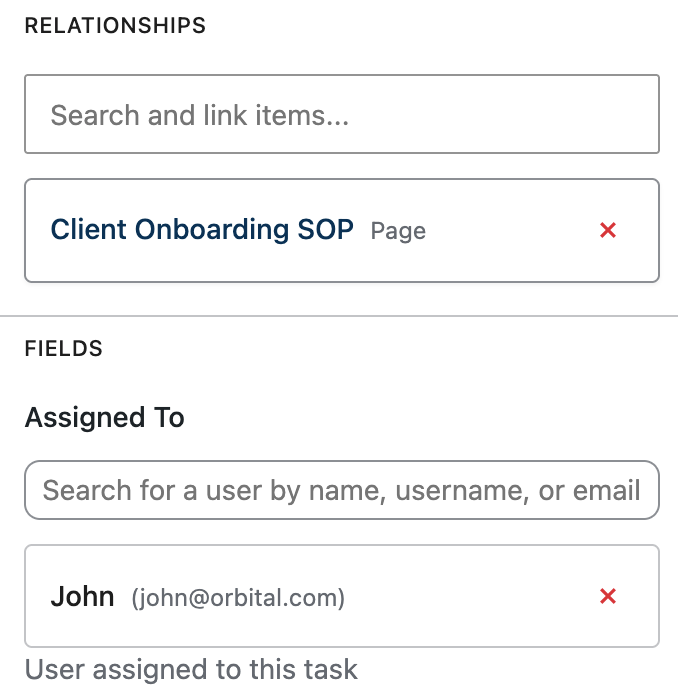
When you install OrbitalWP on your WordPress site, you can configure a relationship meta box for pages, posts, and custom post types, letting you link your content directly to your OrbitalWP tasks.

That relationship information appears throughout the OrbitalWP interface, so you can always jump straight into your documents instead of digging through Google Drive or another file-sharing system. WordPress is a content management system, so let’s use it as one!
Assign Tasks to the Right Person
I spent the first 20 years of my career working in corporate America. I was a programmer building database and web applications. The number one thing that would drive me crazy is watching my manager assign a project to the wrong person.
Managers couldn’t see who was already overloaded, who had done similar work before, or who actually had the right skills for the job. The task went to whoever was top of mind that day, and the project suffered for it.
With OrbitalWP, you won’t make that mistake.
Use the Assigned To Field
Every task in OrbitalWP has an Assigned To field where you can search for a contractor or team member by name, username, or email. Once assigned, that person can see the task along with the linked procedure, so there’s no confusion about what they’re responsible for or how to complete it.
Match Skills to the Task
In OrbitalWP, you can assign categories and tags to tasks. You could tag each task with the different types of work you do.
Task tags could look something like:
- Website Design
- Ads
- Email Marketing
- Plugin Development
- Graphic Design
Then you can run a report to see which user works on what type of tasks. If you see Jan has worked on nothing but ad campaigns, but for some reason was assigned a graphic design job, you may want to look into that assignment and reassign the job to someone else.
Watch for Overloaded Contractors
Before you assign a new task, check how many open tasks that person already has in OrbitalWP. If someone is already juggling five tasks and another contractor has none, the choice should be obvious. Spreading work evenly keeps projects moving and prevents burnout.
You can run a report to see your team workload or use the Kanban board to see who has availability for the next project.
Reassign When Priorities Shift
Sometimes the right person for a task changes after the fact. Maybe a contractor gets sick, a client relationship shifts to a new team member, or a task turns out to need a skill set you didn’t expect. OrbitalWP makes reassigning a task straightforward, so ownership never stays stuck with the wrong person.
So don’t assign tasks to whoever’s available.
Assign them to whoever’s right for the job, and check in on workload regularly. It’s a small habit that saves you from the kind of project chaos I watched play out for two decades.
Documents and Procedures Should Follow the PDSA Cycle
PDSA stands for Plan, Do, Study, and Act. This is a fun way to teach your team that no process is ever complete. You are always working to improve your processes and write down when something unforeseen came up that caused a problem.
Bring It All Together
Running a WordPress agency gets a lot easier once your procedures and tasks live in one place instead of scattered across email, spreadsheets, and Google docs. By setting up OrbitalWP as your knowledge base, writing clear procedures, linking them to individual tasks, and assigning each task to the right person, you give your team or contractors everything they need to do great work without constantly pinging you for answers. And because you’re following the PDSA cycle, your system keeps getting better instead of going stale.
Start small if you need to. Pick one procedure, document it, build out the tasks, and link everything together in OrbitalWP. Once you see how much time that saves you and your contractors, you’ll want to do the same for every process your agency runs on.