Managing WordPress projects is hard. Most teams can juggle a couple of projects and manage it all via email. But once you’re juggling three, four, or five projects a week, the details start to slip through the cracks.
Your team can’t keep up with processes and procedures, track down staging links, or troubleshoot plugin conflicts, let alone make sure the client submits website copy and images on time, without some kind of project management software backing them up. As a WordPress agency owner, you never want to get an email saying your team missed something and the client is unhappy. Even little slip-ups can hurt your credibility, and once you lose a client’s trust, it’s hard to get it back.
So what can you do to make sure your team doesn’t miss a beat, without working 80 hours a week and micromanaging everyone?
The answer has three parts.
- Process and procedures
- Project tracking
- Accountability
In this post, we’ll walk through how to build SOPs your team actually follows, track work so nothing falls through the cracks, and create accountability without micromanaging anyone.
Remember, you’re the captain of the ship. It’s your job to make sure your team has the right tools to make work easy, predictable, and repeatable.
Standardize Your WordPress Workflow with Repeatable SOPs
SOPs, or standard operating procedures, are living documents that show your team how to do a task. These documents should be reviewed and updated anytime an unexpected problem comes up, a deadline is missed, or someone makes a mistake that should have been avoided.
My grandpa was a pilot, and he taught me how to fly while I was in high school. Before every flight, there was a lengthy pre-flight checklist. So when I think of SOPs, I think of airline pilots. The airline industry has proven that following processes and procedures, and continually updating them, results in one of the safest industries in the world.
Your WordPress agency isn’t flying a plane, but the stakes still matter to your clients and your bottom line. A missed step in your launch checklist can mean a site going live with broken forms, missing SEO meta, or a client’s old copy still sitting on the homepage. The fix isn’t hiring more project managers or hoping everyone remembers. It’s building your SOPs directly into the way your team already works.
This is where most agencies get stuck. They write SOP docs, drop it in Google Drive, and it’s forgotten by the second project. The SOP only works if it shows up right when your team needs it, inside the actual task they’re working on.
With OrbitalWP, you can build that checklist directly into your task templates. Every time a new “Website Launch” task gets created, the same pre-flight checklist comes with it: DNS switched, forms tested, SEO meta filled in, client copy uploaded. Custom fields can require that a field is filled in before a task moves to “Done,” so a step can’t get skipped just because someone’s in a hurry.
You can even create tasks to review and update your SOPs right inside OrbitalWP. These tasks can have due dates that you can define. When due dates approach, you will get a notification to go review those SOPs!
Create Accountability Without Micromanaging Your Team
Every project breaks down into who’s doing what by when. Maybe task A, B, and C belong to your lead developer, while task D, E, and F belong to your designer, all due by the same launch date. Once tasks are assigned, OrbitalWP makes ownership visible to everyone, not just the person doing the work.
That visibility is what actually creates accountability. Every stakeholder, from the assigned team member to the project lead to the client-facing account manager, can open the Kanban board or Gantt chart and see exactly where a project stands: what’s done, what’s in progress, and what’s at risk of missing its deadline. Nobody has to ask “where are we on this?” because the answer is already on the board.
OrbitalWP backs this up with automatic notifications. As a due date approaches, assigned team members get an email reminder. If a task passes its due date without being marked complete, an overdue notice goes out. No one has to chase status updates, and no task quietly slips past its deadline unnoticed.
This is accountability without babysitting. Your team doesn’t need you standing over their shoulder, because the board and the notifications are doing that work for you.
Kanban Board and Gantt Chart : How Project Managers Track Work
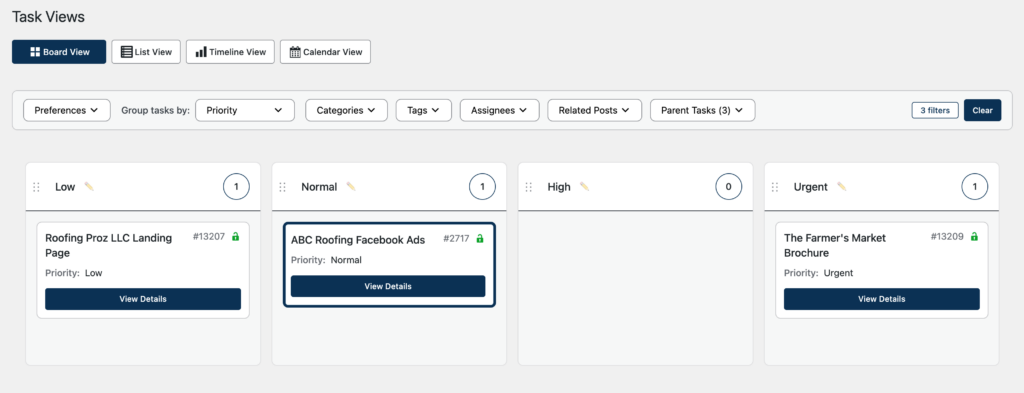
The Kanban board will help you visualize tasks organized into data lanes (think task priority or status). It helps you quickly see which projects should take priority over others. Running a lean WordPress agency means putting the right people on the job at the right time. If you can master project scheduling, you will save money on staffing and reduce client churn by always delivering on time.
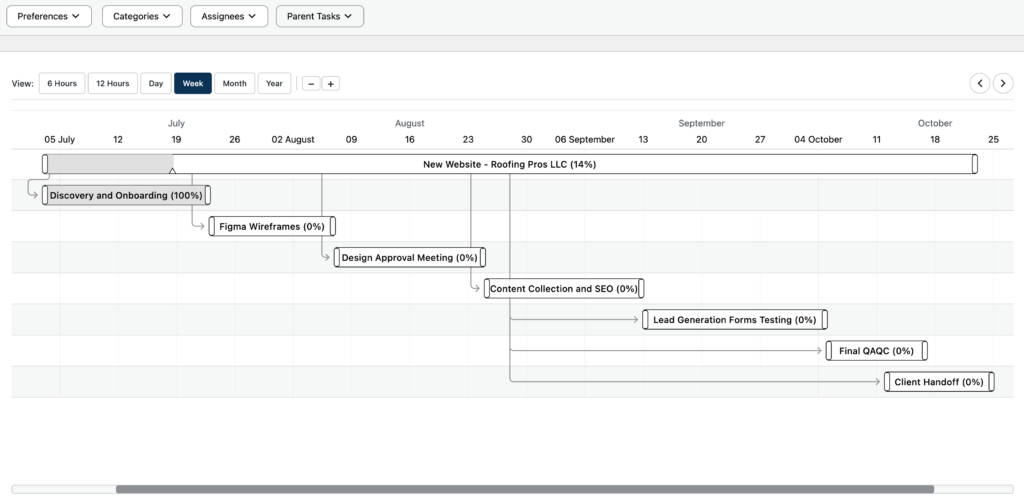
The Gantt chart gives you a bird’s-eye view of every deadline across every project, with each task laid out by its start and end date. This helps you identify scheduling conflicts and task dependencies before they impact your delivery timeline, whether that’s two projects competing for the same week, or a delay on one task pushing back everything after it.
How Your Team Interacts with Tasks in the OrbitalWP Interface
Nobody wants to open a task, hunt for a dropdown, change a status, and hit save, just to move work forward. With OrbitalWP, you skip all of that. Drag a task to a new lane on the Kanban board, and it’s updated. Drag a task on the Gantt chart, and its start and end dates update right along with it.
It’s the fastest way to keep a project current, which means it’s also the way your team will actually use it, instead of letting task data go stale because updating it felt like a chore.
However, if you’re a data nerd like me, sometimes you’d rather edit things directly. OrbitalWP doesn’t lock you into drag-and-drop. Every bit of task data, dates, custom fields, tags, and categories, can also be edited right from the WordPress post edit screen, using the native WP Block Editor you already know.
Note – tasks will only render on the gantt chart if it has a start and end date set in the tasks date custom fields. If you don’t see your task on the gantt chart, double check that both date fields are populated.
Customize Orbital With Custom Fields
OrbitalWP comes with a few Kanban lanes out of the box, but you can add your own lanes using the custom fields manager.
Since OrbitalWP is built natively on WordPress, tasks use the same tag and category taxonomy you’re already familiar with. You can filter the Kanban and Gantt chart by both category and tag to drill down to the task you’re most interested in.
You can quickly extend the Kanban board by adding a “client” custom field. The custom field manager lets you add many different field types, but option-based fields such as Dropdowns, Radio Buttons, and Checkbox fields will generate their own Kanban lanes that visually group your tasks by their assigned value. Learn more by reading the custom fields documentation.
Here is how easy it is for you team to extend OrbitalWP by adding custom fields:
- From your OrbitalWP dashboard, go to Custom Fields and click Add New Field.
- Set the field type to Select (or Dropdown), and name it “Client.”
- Add an option for each of your active clients, Client A, Client B, Client C, and so on.
- Save the field and head to the Kanban board.
- You’ll now see a lane for each client you added.
Give Your Agency the Structure to Grow
Missed details, dropped tasks, and unhappy clients aren’t a sign that your team isn’t good at their jobs. They’re a sign that your agency has outgrown email and spreadsheets as a way to manage work. Every WordPress agency hits this wall eventually, the only question is whether you build the structure to handle it, or keep losing trust one slip-up at a time.
That structure comes down to the three things we covered:
- processes your team actually follows
- tracking that shows you exactly where every project stands
- and accountability that doesn’t require you to check in on everyone constantly.
Get those three right, and you stop firefighting and start running an agency that scales without you working 80-hour weeks to hold it all together.
OrbitalWP gives you all three, built natively into WordPress, so your team never has to leave the platform they already work in every day.
Get your license today and see how much lighter project management can feel.