WordPress agency teams don’t work on one project at a time. They work on five, sometimes across five completely different industries, in the same week. That kind of variety is exactly why project management software isn’t optional for an agency. It’s a requirement. That’s the problem I built OrbitalWP to solve.
Every client works differently. One wants updates over email. One lives in Slack. One shares files through Google Drive, another through Dropbox.
Multiply that by five active clients, and your team is carrying a mental map of communication habits, file locations, and client preferences that nobody ever wrote down.
Instead of asking your team to remember all of that, put it somewhere it can’t get lost. With OrbitalWP, you can store client requirements, preferences, and instructions right inside WordPress, where your team already lives and works every day.
Why WordPress Agency Work Gets Stressful Without a Clear System
You’ve put in the hours building and training your team. They are solid and hard workers. So where does the stress come from?
Stress comes from unpredictability. Stress comes from surprises. Stress comes from a lack of standardization.
If your team knows what to do, who’s doing it, and when it’s due, there’s really only one thing left for them to do: ask questions when they’re unsure.
That’s exactly where you want your team. Asking questions instead of guessing. In my opinion, a team that asks questions already understands the job. They just want to do it the best way possible, for the client and for each other.
As an agency owner, your job now should shift to updating your internal documentation (standard operating procedures aka SOPs) to capture these questions and making sure you are assigning the right person to the task.
I think assigning the right person to the job and spreading the work evenly across your team is the most important role of an agency owner.
How OrbitalWP Solves the Stress Problem
OrbitalWP works best when you tie your tasks to your procedures. You do this with OrbitalWP’s relationship field.
Here are the steps to build a simple SOP in WordPress, then build your tasks around it:
- Create a post or page for a specific procedure
- Create a task inside OrbitalWP
- Link the task to the procedure.
It’s really that simple.
Now when your team gets assigned a task, they can consult the SOP if they have questions.
Always Update Your SOPs
If a team member stops to ask a question, you should try to find the answer in your SOP. If the answer is in the document, maybe it was ambiguous and could be re-written. If the question isn’t in the procedure, you can plug this whole by adding it to your internal documentation so future team members don’t miss it.
Give Your Team One Place to Manage the Work
Project management software for WordPress agencies solves one specific problem first: it gives everyone a shared view of the work. Data is stored in the WordPress database so there is one single authoritative source.
Designers, developers, writers, account managers, and the owner can all look at the same Kanban Board and see what needs to happen, who owns it, and when it’s due. That sounds simple. It changes almost everything about how an agency runs.
If the timing of projects is an issue, hop over to the Gantt chart to see how your work overlaps over the coming weeks. OrbitalWP makes it easy to drag tasks around and re-work the schedule
Clarify Responsibilities Before Work Falls Through the Cracks
Every task needs an assignee. Not “the design team.” One person, Like Melissa or Joshua. Pick the person best suited for the task and assign it to them.
OrbitalWP’s assignee is the person responsible for marking a task complete. Then OrbitalWP goes one step further with the approval field. An approver is a competent team member that will review the completed work and either request changes or mark it approved
When a task has a name attached to it, a due date, and a priority, the guesswork disappears. Nobody has to ask “is someone handling this?” because the board already answers that question.
This matters most during handoffs. A website build moves from discovery to design to development to QA to launch. Every one of those handoffs is a place where things get dropped if nobody owns the next step. Clear task ownership closes that gap. The work doesn’t sit waiting for someone to notice it. It sits assigned to a person, with a due date attached, in plain view.
Reduce Interruptions and Unnecessary Meetings
A lot of internal meetings exist for one reason, nobody trusts the current status of the work.
So the team gets on a call to ask questions a task Kanban or metadata should already answer:
- Where are we on the homepage redesign?
- Did the client approve those revisions?
- Is the plugin update done on the retainer sites?
When task statuses are accurate and current, those meetings shrink or disappear. Team task management removes the need for the constant “quick check-in.” People check the board instead of checking with each other. That gives everyone their day back.
Help Team Members Focus on the Right Work
You have your SOPs, your tasks entered, and the work is setup for the week. Most employees work on whatever lands on their desk last. This can be a major problem. You want them working on the highest priority tasks, not some low priority time suck.
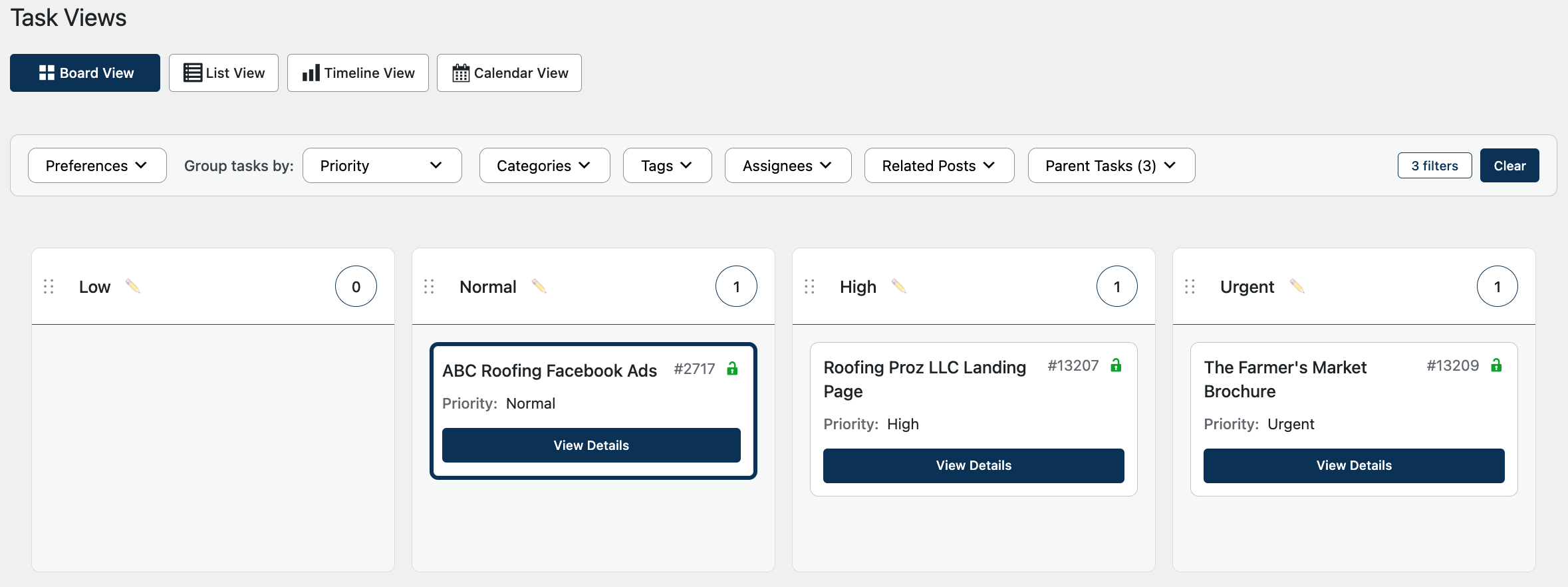
Train the team to go to the Kanban board, filter on priority, and see what tasks have been labeled the highest priority. Then start knocking out the work.
Deliver a Better Product for the Client
Internal chaos does not stay internal. I repeat, internal chaos does not stay internal! It shows up in the final product.
A missed revision means the client gets a page that still has last month’s copy on it. A skipped QA step means broken links go live. A lost email means a client approval never got logged, and now two people on the team think two different things were agreed to.
Managing client work well means the client’s feedback, approvals, and requests live in one traceable place. When a client leaves a comment on a task, that comment doesn’t disappear into an inbox. It stays attached to the task, where the whole team can see it. When a client approves a design, that approval is on record. Nobody has to dig through email threads three weeks later to figure out what was actually signed off on.
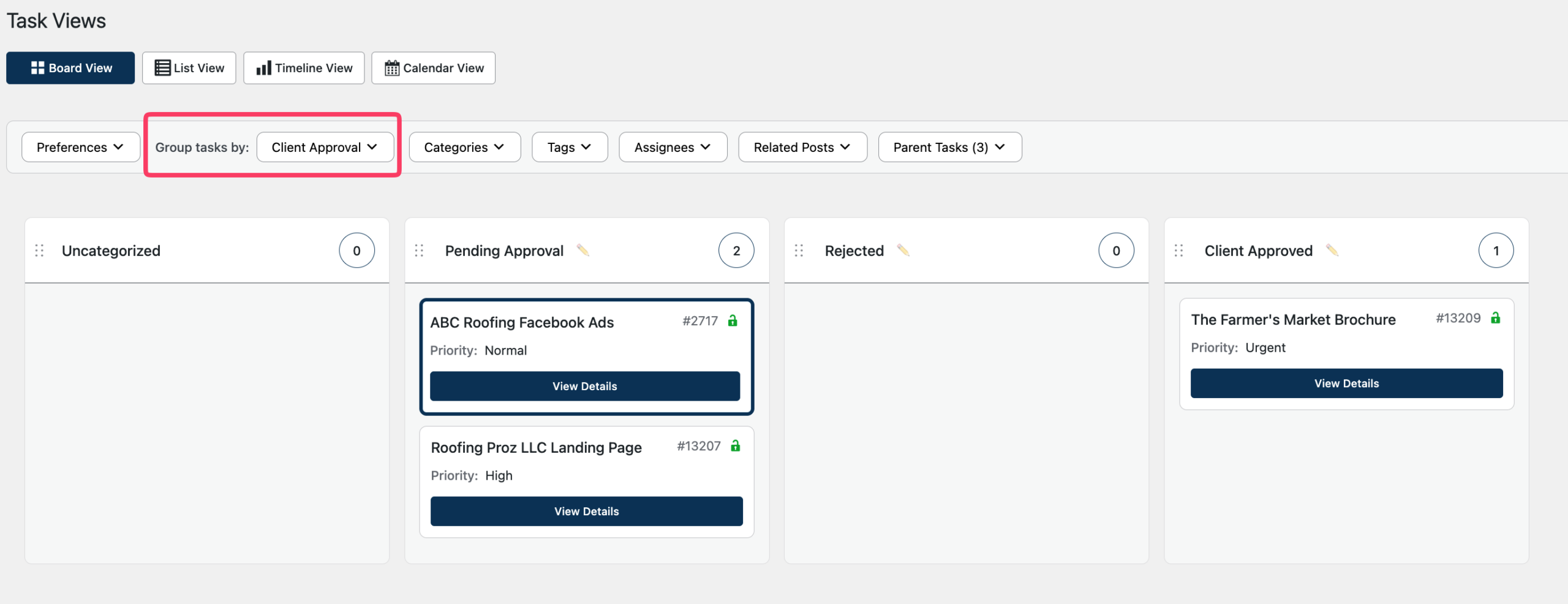
You could even add your own custom field for client approval, and visualize that status right on the Kanban board.
Save Time and Money by Building Repeatable Processes
Here’s where a solid agency workflow starts paying for itself. Most agency work is repeatable: onboarding, website builds, support tickets, launch day. Turn each one into a template once, and the agency stops rebuilding it from memory every time.
A new website build starts from a template with discovery, design, development, revisions, QA, and launch already laid out as tasks. A new hire doesn’t have to ask five people how support tickets work. The queue already shows them the process.
In OrbitalWP, you can create task templates that you can re-use time and time again.
Templates save time which means you save more money and your team is happier not doing the same mundane tasks over and over.
Every hour spent re-explaining a process is an hour not billed. Every piece of rework from a missed step is unpaid time. Repeatable processes cut both down, and they make the agency less dependent on any one person’s memory, so it survives a vacation, a sick day, or someone leaving.
The goal is simple. Build the process once. Use it every time. Improve it when it breaks.
I built OrbitalWP to keep that process inside WordPress itself, so it lives where the team’s already working instead of one more tab to check.
Conclusion
Project management software helps WordPress agencies run with less stress and more control. By giving the team one place to manage tasks, deadlines, responsibilities, approvals, and client requests, agencies can reduce confusion, improve communication, and protect their team from unnecessary chaos. The result is a calmer internal workflow, a better final product for the client, and a more profitable agency that saves time and money by working from clear, repeatable systems.